FontFancy ✦ Fancy Text Generator
Type your text — 64 styles transform instantly, key by key. Click any style to copy and preview it.
No favorites yet — tap ☆ on any style to save it here.
Mix styles — combine a Unicode font with a decorative frame
Kept only in this browser for up to 90 days — never sent to FontFancy.
Good styles to start with
FontFancy is a free fancy text generator that turns whatever you type into dozens of stylish Unicode looks — 𝐛𝐨𝐥𝐝, 𝑖𝑡𝑎𝑙𝑖𝑐, 𝓬𝓾𝓻𝓼𝓲𝓿𝓮, ꜱᴍᴀʟʟ ᴄᴀᴘꜱ, Ⓑⓤⓑⓑⓛⓔ and aesthetic — each with one‑tap copy for Instagram, TikTok, Discord, X and game names. No sign‑up, no app to install.
What is a fancy text generator?
A fancy text generator is a tool that converts normal letters into look‑alike characters from the Unicode standard, so the result copies and pastes as plain text anywhere. You are not changing the font — you are swapping each letter for a different Unicode symbol that already looks bold, italic, cursive or bubbled. That is why “𝓯𝓪𝓷𝓬𝔂” keeps its style inside an Instagram bio, a Discord message or a game nickname, even though those apps never let you install a font.
Because these are real characters and not images, every style you copy from FontFancy stays selectable and pastes as text — a genuine advantage over screenshot‑based “font” tricks. If the difference between a Unicode style and an installable typeface is new to you, our explainer on what fancy fonts actually are walks through it with side-by-side code points.
How to use FontFancy
The generator at the top of this page works instantly and entirely in your browser — nothing is uploaded. To style any text:
- Type or paste your text into the big input box at the top.
- Browse the live styles — 64 variations update as you type. Use the tabs (Unicode fonts, Gaming, Cute, Decorative) to filter.
- Click a style to copy it. A “Copied ✓” confirmation appears; the character count and previews update too.
- Paste it into your bio, caption, username or chat.
Want something unique? The Mix styles panel lets you wrap a Unicode font inside a decorative frame (for example ꧁𝓥𝓲𝓹꧂), and the Shuffle decorations button rerolls the ornaments so your name doesn’t look like everyone else’s.
Popular fancy font styles to copy
Here is how the word Fancy looks in some of the most‑copied styles on FontFancy. Every example below is real copyable text, not a picture:
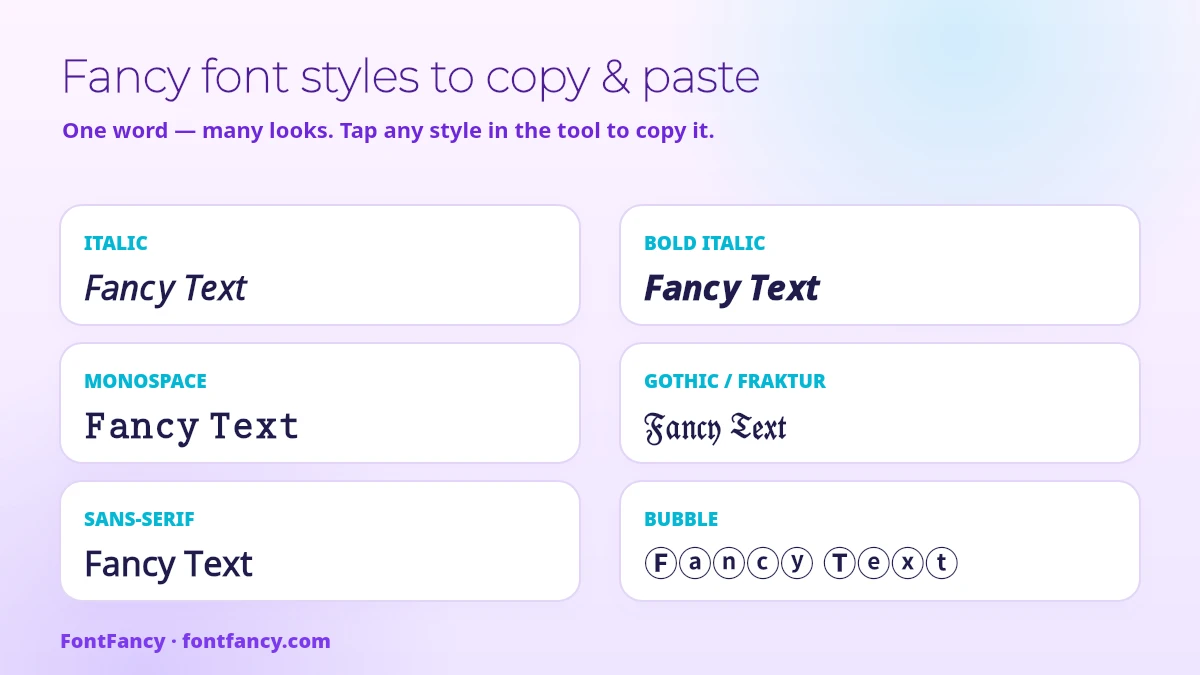
| Style | Example | Great for |
|---|---|---|
| Bold | 𝐅𝐚𝐧𝐜𝐲 | Headlines, standout bio lines |
| Italic | 𝐹𝑎𝑛𝑐𝑦 | Quotes, soft emphasis |
| Bold italic | 𝑭𝒂𝒏𝒄𝒚 | Strong emphasis |
| Cursive / script | 𝓕𝓪𝓷𝓬𝔂 | Aesthetic bios, wedding‑style names |
| Gothic / Fraktur | 𝔉𝔞𝔫𝔠𝔶 | Gaming clans, metal / gothic vibes |
| Double‑struck | 𝔽𝕒𝕟𝕔𝕪 | Techy, outline look |
| Monospace | 𝙵𝚊𝚗𝚌𝚢 | Code‑style usernames |
| Small caps | ꜰᴀɴᴄʏ | Clean, minimal handles |
| Bubble | Ⓕⓐⓝⓒⓨ | Cute captions, comments |
| Wide / aesthetic | Fancy | Vaporwave, Y2K aesthetics |
| Strikethrough | F̶a̶n̶c̶y̶ | Edits, “crossed‑out” jokes |
Each linked style has its own page with a filtered generator, a copy grid and the quirks of that alphabet. The live tool includes many more — bubble (filled), squared, superscript, upside‑down, currency symbols, plus themed frames for gaming and cute coquette‑style names. Which of these are rising right now, and which have peaked, is tracked in this year’s text style trends; for mixing styles into a mood, see the aesthetic text recipes.
Decoration symbols to pair with your fancy text
A style on its own changes the letters. What makes a name look finished is usually the marks around it. Below are 178 decoration symbols, dividers and emoji combos, grouped so you can find a mood rather than scroll a wall. Tap any tile to copy it, then paste it before or after the text you generated above.
These are plain Unicode characters, exactly like the letter styles — nothing here is an image and nothing needs an app. The same warning applies though: a symbol that renders on your phone can appear as an empty box for someone on an older device.
Stars & sparkles (22)
Light, airy marks that read well on a pale profile background. Pair them with small caps or italic serif for a calm look.
Hearts & bows (22)
The softest set here. These sit best around a short name — long names plus a heart frame push you past the character limit fast.
Crowns & royal (18)
Heavier symbols meant to bracket a name rather than sit inside it. Common in clan tags and game display names.
Fire & bold (20)
High-contrast marks. The colour-emoji ones (🔥, 💥) will not render inside most game name fields — keep those for social bios.
Dark & gothic (16)
Sharp, cold shapes. Several of these carry combining marks, so they may sit slightly differently on iOS than on Android.
Flowers & moon (20)
Botanical and lunar marks, the usual companions for cursive and script styles.
Dividers & emoji combos (60)
Longer strings made to sit on their own line — between two lines of a bio, above a pinned post, or under a server rules header. They mix symbols with colour emoji such as 🦋 and 🎧, so the colour parts will look slightly different on iPhone, Android and Windows. Nothing breaks; only the emoji artwork changes.
Kaomoji to copy: 189 faces sorted by mood
A kaomoji is a face drawn with text characters and read upright, like (˶ᵔ ᵕ ᵔ˶), instead of sideways like :-). The style comes from Japanese chat culture — kao means face and moji means character — and because every part is a Unicode character, a kaomoji pastes anywhere text goes, exactly like the letter styles above.
They are grouped by the feeling they carry, because that is how people look for them. Each group notes the one or two characters doing the work, so you can recognise the building blocks and adjust a face yourself. Tap once to copy; your last copies stay in the Copied on this device panel at the top for up to 90 days.
Everyday favourites (18)
The all-rounders: short enough for a bio line and neutral enough for most chats. If you only save one group, save this one.
Happy & excited (24)
Arms up, sparkles and little ✧ marks: the faces people put after good news. The ones with ᐟ read like an exclamation without shouting.
Love & shy (20)
Blushing cheeks ⸝⸝ and hearts. The shy ones with 👉👈 carry the emoji in colour, so they look different on each phone brand.
Sad & crying (22)
Tears are usually ╥ or ◞‸◟. Pick a soft one for a caption; the long sobbing faces take up most of a short bio line.
Angry & annoyed (15)
The ꐦ mark is the “vein pop” from manga. Good for jokey frustration — none of these are meant to be taken seriously.
Sleepy & tired (14)
The trailing ᶻ 𝗓 𐰁 is the snore. Handy as a status line or a late-night caption.
Surprised & confused (14)
Wide eyes °ㅁ° and a gasp. Add !! or leave it off depending on how loud the moment is.
Wink & playful (14)
One eye open •ᴗ-. These work best at the end of a sentence, as a wink to the reader.
Cats (16)
Cat faces are built from whisker marks ≽ ≼ and ears ᐠ マ. They stay short, which makes them one of the few kaomoji that fit next to a game name.
Dogs & puppies (16)
The ૮ ა pair makes floppy ears; the middle character sets the mood, from sleepy - ﻌ - to excited >ﻌ<.
Bunnies & frogs (16)
Bunnies use ᐢ ᐢ ears; frogs are drawn with 𝄐 eyes. Both look softest with a small caps or script name beside them.
78 stylish nickname ideas to copy
Here is the same short name, Alex, run through the styles people copy most and then wrapped in the decorations above. Use them as a shape to follow: tap one to copy it, then swap the letters for your own name in the generator at the top of this page.
One name, eighteen looks (18)
Need a name rather than a style? If you are still deciding what kind of nickname you want, the nickname font guide helps you pick by purpose first. These 60 nicknames are grouped by the impression they give. Each label tells you the base word and the Unicode style used, so you can type your own word into the generator, pick the same style from the list and add the same frame.
Gaming & competitive (15)
Cute & soft (15)
Aesthetic & dreamy (15)
Bold & royal (15)
A practical note that most generator pages skip: the wrapped versions cost you characters. Alex is four characters, but ꧁𝓐𝓵𝓮𝔁꧂ is six, and some frames add more than they look like they do. If a game rejects your name for length, drop the frame before you drop the style.
Nickname templates: swap in your own name
These 51 templates come already decorated around a sample word — name, text or a real first name such as Emma or Sabrina. Copy one, paste it into your notes app, and replace the sample word with your own. If you want your word in the same letter style, generate it at the top of this page first and paste it into the gap.
Two things to check before you save one as a profile name: templates with spaces inside the frame may be trimmed by apps that collapse double spaces, and the tiny stacked marks (such as ͥ ͣ ͫ in the “VIP” templates) are combining characters that some game name fields strip out.
Want the meaning behind the frames rather than just the look? Our guide to what ꧁꧂ and other name brackets really are decodes each character, and the heart, star and crown symbols page explains why the same heart can turn into a red emoji on one phone and stay a plain outline on another. For a name that shows nothing at all, use the blank character builder.
Where the styled letters come from
Every style in the generator is a lookup table: your letter goes in, a different Unicode character comes out. Most of those characters live in a single block, Mathematical Alphanumeric Symbols (U+1D400–U+1D7FF), which holds 996 assigned characters — 936 styled letters and 50 styled digits. Of the letters, 652 are Latin and 284 are Greek; there are no styled versions of any other script. The table shows which block each popular style is drawn from.
| Style | Example | Unicode source | Starts at |
|---|---|---|---|
| Bold serif | 𝐀𝐁𝐂 | Mathematical Alphanumeric Symbols | U+1D400 |
| Italic serif | 𝐴𝐵𝐶 | Mathematical Alphanumeric Symbols (+ ℎ U+210E) | U+1D434 |
| Script | 𝒜ℬ𝒞 | Mathematical Alphanumeric Symbols + Letterlike Symbols | U+1D49C |
| Bold script | 𝓐𝓑𝓒 | Mathematical Alphanumeric Symbols | U+1D4D0 |
| Fraktur (gothic) | 𝔄𝔅ℭ | Mathematical Alphanumeric Symbols + Letterlike Symbols | U+1D504 |
| Double-struck | 𝔸𝔹ℂ | Mathematical Alphanumeric Symbols + Letterlike Symbols | U+1D538 |
| Monospace | 𝙰𝙱𝙲 | Mathematical Alphanumeric Symbols | U+1D670 |
| Bubble | ⒶⒷⒸ | Enclosed Alphanumerics | U+24B6 |
| Squared (filled) | 🅰🅱🅲 | Enclosed Alphanumeric Supplement | U+1F170 |
| Fullwidth | ABC | Halfwidth and Fullwidth Forms | U+FF21 |
| Small caps | ᴀʙᴄ | Phonetic Extensions, IPA Extensions, Latin Extended-D | mixed |
| Strikethrough | A̶B̶C̶ | Each letter + combining long stroke overlay | U+0336 |
Two details explain most “why does this letter look different?” questions. First, the script, fraktur and double-struck alphabets have 24 gaps in the maths block, because letters such as ℬ, ℭ and ℂ were already encoded years earlier in the Letterlike Symbols block; a correct generator fills those gaps from there, which is why one letter can sit slightly off in some fonts. Second, small caps has no alphabet of its own — it is assembled from phonetic letters, and there is no true small capital Q or X, so those two are borrowed look-alikes. The same limit is why names written in Tamil, Devanagari or any other script cannot be styled at all; we cover that case with real examples in Amma, Appa and Ennaval font styles.
Source: Unicode code chart for Mathematical Alphanumeric Symbols; counts checked against the Unicode Character Database.
Why fancy text sometimes shows empty boxes
Fancy characters are ordinary letters only to us; to a device they are rarer Unicode symbols, and a phone or app can only show a symbol if its installed fonts include that glyph. When a font is missing the glyph, you see a small empty rectangle instead of the letter. To avoid it:
- Stick to widely supported styles — bold, italic, cursive, small caps, bubble and wide render on almost every modern phone.
- Test before you commit: paste the text into a comment or a note first to check it displays (our troubleshooting guide matches each symptom to its cause), especially inside a game with a permanent name‑change cost.
- Remember that heavy decorative frames (꧁ ༒ ꧂) use more characters, so they can hit a game’s name‑length limit faster.
Where fancy text works (and where it doesn’t)
Unicode styles paste into most places that accept text: Instagram bios and captions, TikTok display names, Discord messages and nicknames, X (Twitter) posts, Facebook, and the in‑game name fields of titles like Free Fire, PUBG Mobile and Roblox.
One honest caveat worth knowing: on TikTok and many other platforms the @username (handle) only accepts letters, numbers, underscores and dots — it will not keep fancy fonts. It is the display name that shows your styled text. So generate a fancy display name, and keep the handle plain.
WhatsApp is the odd one out: it already has real bold, italic and strikethrough inside messages, so styled letters matter mostly for your profile name and group titles — the details are in our WhatsApp fonts guide.
Fancy text generator — FAQ
Is FontFancy free to use?
Yes. FontFancy is a completely free fancy text generator. You can convert and copy as many styles as you like with no account, no download and no watermark.
Are these real fonts I can install?
No — and that is the point. They are Unicode characters that only look like different fonts, so they paste as text into apps that would never let you install a font, such as Instagram, TikTok, Discord and game name fields.
Why does some fancy text look like empty boxes on my phone?
An empty box means the app’s font is missing that particular Unicode symbol. Stick to widely supported styles like bold, italic, cursive, small caps and bubble, and test the text in a comment before using it as a permanent name.
Can I use fancy text in my TikTok or Instagram username?
You can use it in your display name, which accepts Unicode. The @username handle only allows letters, numbers, underscores and dots, so it will not keep the fancy style — style the display name and keep the handle plain.
What is a kaomoji and how do I use one?
A kaomoji is a face made from text characters and read upright, such as (˶ᵔ ᵕ ᵔ˶). Tap any face in the kaomoji section to copy it, then paste it at the end of a caption, chat message or bio line. It is plain Unicode text, so it works wherever emoji do.
Does FontFancy remember what I copied?
Yes, on your own device only. The last styles, symbols and kaomoji you copied are kept in your browser for up to 90 days and shown in the Copied on this device panel, where you can filter by 7, 30 or 90 days or clear the list. Nothing is sent to FontFancy.
Updated 26 September 2026 — removed a few symbols with religious, smoking or alcohol meaning from the copy grids.
Related articles
View all → Ankit Font Style — Stylish Ankit Name for Instagram, Copy & Paste
 Wide Text Generator for aesthetic Vaporwave Captions, Wide Spaces Included
 Naveen Font Style — Stylish Naveen Name for Instagram, Copy & Paste
 Monospace Text Generator: 62 Fixed-Width Letters and the Gaps Between Them
 Shubham Font Style — Stylish Shubham Name for Instagram, Copy & Paste